A backup is only useful if it can be restored, in an acceptable time and with the data the business needs. The 3-2-1 rule (three copies, two media, one outside the company) is the minimum. Against ransomware you also need an immutable or isolated copy and, above all, regular restore tests.
What the 3-2-1 rule says and where it stops
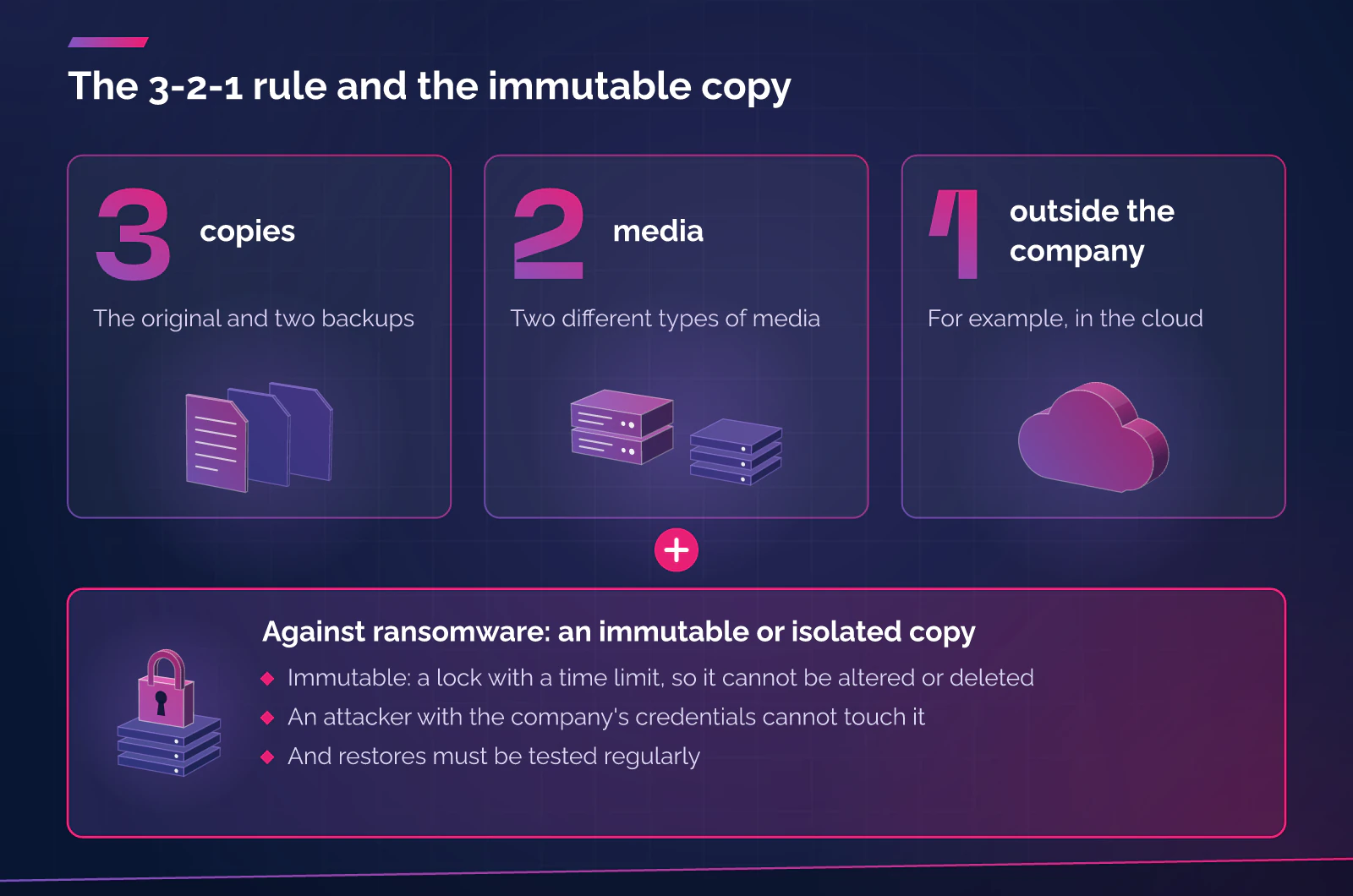
The 3-2-1 rule asks for three copies of every important file (the original and two backups), on two different types of media, with one copy outside the company. That is how INCIBE’s backup guide (2018 edition) describes it, using the cloud as its example of an offsite copy, and how ENISA recommends it in its ransomware report (July 2022).
It covers physical risks well: a failing disk, a theft, a fire. On its own it does not cover the case that worries people most today. CISA, the US cybersecurity agency, explains in its #StopRansomware guide (October 2023) that most attackers look for accessible backups in order to delete or encrypt them, that they harvest credentials from the environment to reach the backup systems and that they exploit backup software that has not been updated. A copy on the same network and with the same admin credentials as the servers only counts as a copy for as long as nobody gets into the network.
The same guide warns about a case that is easy to overlook: if an attacker encrypts the local files, the encrypted versions are synchronised to the cloud and can overwrite data that was good. Syncing is not backing up.
What is the 3-2-1-1-0 variant?
The 3-2-1-1-0 variant adds an immutable or offline copy (the second 1) and zero errors in recovery verification (the 0). It is mainly promoted by backup software vendors, and it does not appear under that name in the INCIBE, CCN-CERT, ENISA or CISA guides we have consulted. The content, however, is there: CISA’s advisory on SafePay ransomware (20 October 2026) asks for offline backups, encrypted and immutable backup data, and regular backup and restore tests.
We keep the idea and drop the number: there must be a copy that an attacker with the company’s credentials cannot touch, and you must show from time to time that it can be restored.
What it means for a backup to be immutable (and what it does not)
NIST publication SP 800-209 (October 2020) defines immutability as the ability to lock data once it has been created so that it cannot be altered or deleted. In practice it is a lock with a time limit. It is worth asking four questions before accepting it:
- Who can remove the lock? If the same administrator account that an attacker may have stolen can do it, the immutability is only apparent.
- How long does it last? Once the period is over the copy can be deleted, and an incident is not always discovered the same day.
- What is inside? An immutable copy of data that is already encrypted is immutable and useless. That is why CCN-CERT (BP/21, April 2021) recommends having room to keep more than one copy of the same asset, so that an earlier, unencrypted one exists.
- Does it depend on the same access? An immutable copy on the same console and the same account as the original data is still exposed to credential theft.
Isolation: the copy the attacker cannot see
CCN-CERT recommends isolating backup servers or arrays from the rest of the network, so that malware cannot jump to them from an infected machine, and making a physically isolated copy, disconnected from the network, at regular intervals (its example is monthly). For an SME this translates into modest measures:
- A backup administration account that is different from the servers’ own, with two-step verification.
- A backup console that cannot be reached from any machine.
- Backup software that is up to date.
- At least one copy that is not permanently connected: a disk or a tape that is unplugged, or a service with a retention lock.
RPO and RTO: how much you can lose and how long you can wait
NIST (SP 800-34 Rev. 1, May 2010) defines the RTO as the maximum time a resource can be unavailable before the impact becomes unacceptable, and the RPO as the point in time to which data can be recovered given the most recent backup. In plain words: the RPO is how much work you can afford to lose and the RTO is how long you can afford to be down.
They are measured per system, not per company. A shop in Andorra that backs up every night and loses its server at six in the evening has lost a day of recorded sales; if they cannot be rebuilt, the real RPO is 24 hours. A professional practice in Girona can tolerate half a day without its file server, but not the loss of a client’s file with an open deadline. How often you back up depends on the RPO, and the restore method (whole machine, file or database) depends on the RTO.
Restore tests: the only way to know
INCIBE puts it unambiguously: if you do not test that backups can be restored, there is no guarantee the information can be recovered, and periodic tests should be scheduled. CISA asks for regular tests of the availability and integrity of backups. There is a legal basis as well: Article 32(1) of the GDPR and Article 35.1 of Andorra’s Llei 29/2021 on personal data protection refer to the ability to restore access to personal data quickly after an incident and to a process for regularly verifying the measures.
A useful test:
- Is done in a separate environment, not on the production system.
- Restores a real case, such as a whole server or the ERP database, not just a file.
- Measures the full time until the application works and compares it with the RTO.
- Checks that the data is good: open the application, run a query, generate a test invoice.
- Is run by someone other than the usual administrator, following the written procedure, which INCIBE recommends with staff absences in mind.
- Leaves a record of what failed and a fix with an owner.
No source we consulted sets a single frequency. Our own criterion is at least one full restore a year and partial checks more often on the systems that billing depends on.
Backups of SaaS services: Microsoft 365 and similar
Microsoft’s shared responsibility documentation (updated 24 August 2026) leaves the customer’s data in the customer’s hands in every model, SaaS included, where it lists Microsoft 365. Its resiliency document explains that the platform is designed against infrastructure failures and that, because most losses come from customer actions, it lets customers recover accidentally deleted items themselves.
That protects against a user’s mistake, but leaves other scenarios out. The recycle bin and the retention live in the same tenant and under the same account as the data: if an admin account is compromised, the data and its recovery mechanism are lost together. An independent backup is therefore a decision for the company, not a feature to assume is included. The inventory should count email, OneDrive and SharePoint, Teams, the ERP or CRM bought as a service and the domain’s DNS records.
What the regulations ask for
For an SME in Andorra or Catalonia, the general requirement is the security of processing (GDPR, Article 32; Llei 29/2021, Article 35). Directive (EU) 2022/2555 (NIS2) adds, for the entities in scope, Article 21(2)(c): business continuity, such as backup management and disaster recovery. For an SME the effect usually arrives through contracts, when a client that is in scope asks its supplier for evidence. This does not replace legal advice.
Where we have an interest, and where we don’t
To be clear: BDR Group offers cloud backup and continuity within its managed cloud services, through Andorra Cloud. According to the service page, the backup strategy is defined to fit the customer (frequency, retention and capacity), backups are scheduled and their execution is monitored, and there is support for recovery within the agreed scope. This article says nothing about the immutability, retention or replication of our backups: those are points to be specified in the proposal and, with us or with any other provider, worth asking for in writing.
What to do now
- List the systems and data that cannot be lost, including those in SaaS services, and note the RPO and RTO the company can accept for each.
- Check where the current backups are: how many, on which media, which one is outside the company and with which account they are administered.
- Identify which copy an attacker with administrator credentials cannot touch: an offline one or one with a lock that the same account cannot remove.
- Schedule a restore test of a real system, in a separate environment and with the time measured, and keep the result.
- Ask the provider of each SaaS service what it covers and what it does not, and decide whether you need an independent backup.
Frequently asked questions
Is a folder synchronised to the cloud a valid backup?
Not on its own. Synchronisation also replicates changes and deletions, and a file encrypted by ransomware can overwrite the good version, as CISA warns. A backup keeps earlier versions and does not depend on the same access as the data.
Does an immutable backup protect me from ransomware?
It protects the backup from being altered or deleted during the lock period, but it does not guarantee that the data inside is good. You need to keep earlier versions, test the restore and control who can remove the lock.
How often should backups be tested?
The official sources ask for a set frequency and regular tests, without giving a figure. We recommend one full restore a year and more frequent checks on critical systems.
Does Microsoft 365 already back up my data?
Microsoft protects the platform against infrastructure failures and provides tools to recover deleted items, but its documentation assigns the data to the customer. If you want an independent version, for example against a compromised account, you need to plan for it separately.
Sources
- INCIBE. Copias de seguridad: una guía de aproximación para el empresario (in Spanish; 2018 edition, sections 4, 5.1 and 5.5). Accessed: 25 October 2026. https://www.incibe.es/sites/default/files/contenidos/guias/guia-copias-de-seguridad.pdf
- ENISA. Threat Landscape for Ransomware Attacks. July 2022. Accessed: 25 October 2026. https://www.enisa.europa.eu/sites/default/files/publications/ENISA%20Threat%20Landscape%20for%20Ransomware%20Attacks.pdf
- CISA. #StopRansomware Guide. October 2023. Accessed: 25 October 2026. https://www.cisa.gov/sites/default/files/2025-03/StopRansomware-Guide%20508.pdf
- CISA. #StopRansomware: SafePay Ransomware (advisory AA26-293A). 20 October 2026. Accessed: 25 October 2026. https://www.cisa.gov/news-events/cybersecurity-advisories/aa26-293a
- CCN-CERT. BP/21 Gestión de incidentes de ransomware (in Spanish). April 2021, section 3.5.4. Accessed: 25 October 2026. https://angeles.ccn-cert.cni.es/index.php/es/docman/documentos-publicos/informes-de-buenas-practicas/321-ccn-cert-bp-21-gestion-de-incidentes-de-ransomware/file
- NIST. SP 800-209, Security Guidelines for Storage Infrastructure. October 2020. Accessed: 25 October 2026. https://nvlpubs.nist.gov/nistpubs/SpecialPublications/NIST.SP.800-209.pdf
- NIST. SP 800-34 Rev. 1, Contingency Planning Guide for Federal Information Systems. May 2010. Accessed: 25 October 2026. https://nvlpubs.nist.gov/nistpubs/legacy/sp/nistspecialpublication800-34r1.pdf
- European Parliament and Council. Regulation (EU) 2016/679 (General Data Protection Regulation), Article 32. OJ L 119, 4 May 2016. Accessed: 25 October 2026. https://eur-lex.europa.eu/legal-content/EN/TXT/?uri=CELEX:32016R0679
- General Council of Andorra. Llei 29/2021, del 28 d’octubre, qualificada de protecció de dades personals (Qualified Law 29/2021 of 28 October on personal data protection; in Catalan), Article 35. BOPA no. 119, 17 November 2021. Accessed: 25 October 2026. https://www.apda.ad/assets/pdf/CGL20211115_08_58_32.pdf
- European Parliament and Council. Directive (EU) 2022/2555 (NIS2), Article 21. OJ L 333, 27 December 2022. Accessed: 25 October 2026. https://eur-lex.europa.eu/legal-content/EN/TXT/?uri=CELEX:32022L2555
- Microsoft. Shared responsibility in the cloud (Microsoft Learn, updated 24 August 2026). Accessed: 25 October 2026. https://learn.microsoft.com/en-us/azure/security/fundamentals/shared-responsibility
- Microsoft. Data Resiliency in Microsoft 365 (Microsoft Learn, updated 27 January 2026). Accessed: 25 October 2026. https://learn.microsoft.com/en-us/compliance/assurance/assurance-data-resiliency-overview
Want to review your backups?
If you want us to review how you protect and recover the company’s data, start with the service page: Managed business cloud in Andorra. The backup details are at Andorra Cloud.