

SPF says which servers may send email on behalf of your domain, DKIM signs each message so that it can be checked that it has not been altered, and DMARC tells the receiver what to do if both checks fail and sends you reports. Google, Yahoo and Microsoft require them from bulk senders, and any company domain should have them.
What each record does
All three are TXT records in the domain’s DNS (example: yourdomain.ad).
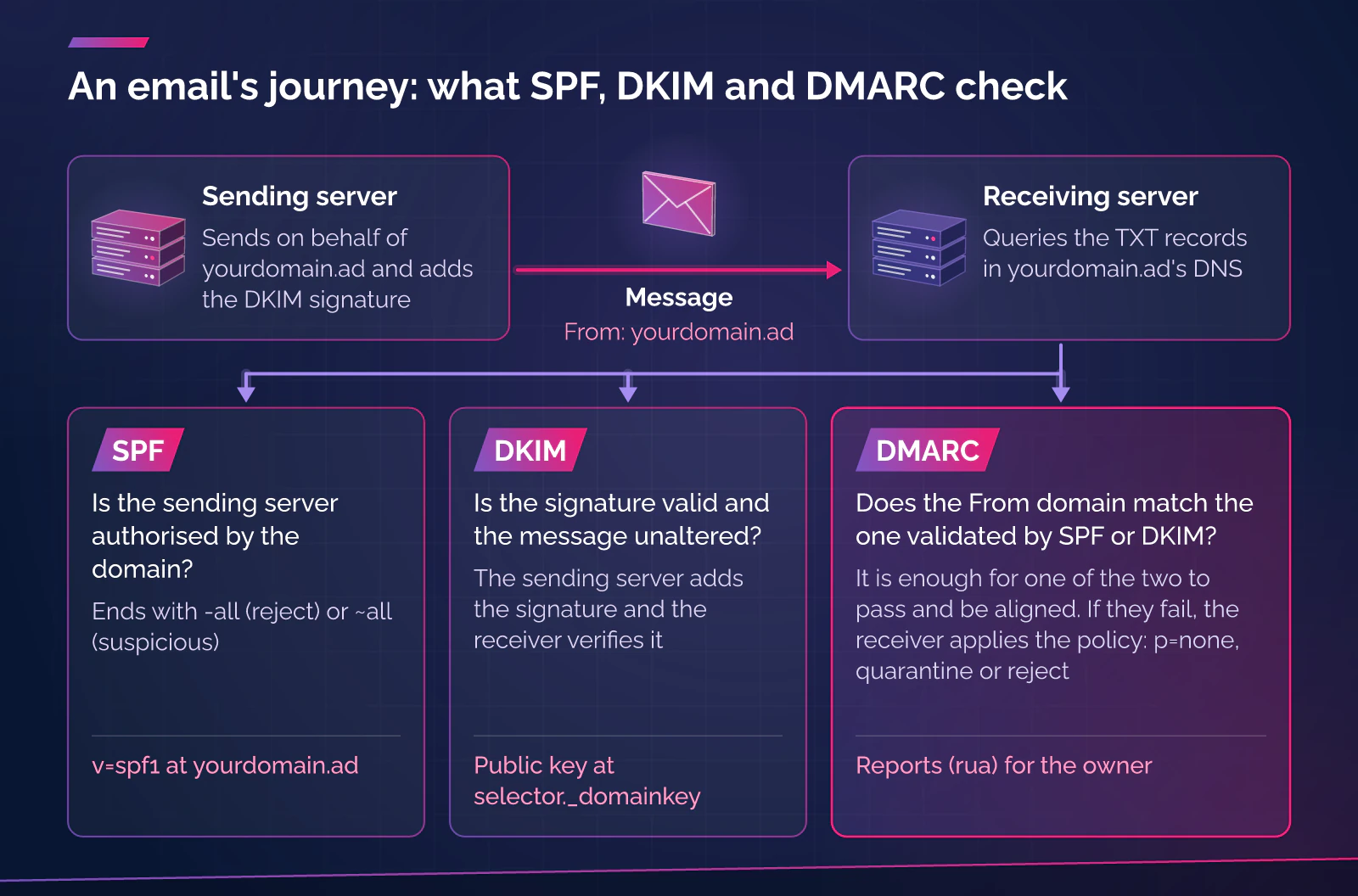
| Record | Where it is published | What it says | Standard |
|---|---|---|---|
| SPF | At yourdomain.ad, starting with v=spf1 | Lists the servers and services allowed to send, and ends with -all (reject) or ~all (suspicious) | RFC 7208 (2014) |
| DKIM | At selector._domainkey.yourdomain.ad | Publishes the public key the receiver uses to verify the signature added by the sending server | RFC 6376 (2011) |
| DMARC | At _dmarc.yourdomain.ad | Sets the policy (p=none, quarantine or reject) and the address for reports (rua) | RFC 9989 (May 2026) |
A domain can have only one SPF record, and if the receiver finds more than one the result is a permanent error (RFC 7208, sections 3.2 and 4.5). The evaluation also allows a maximum of 10 mechanisms that trigger DNS queries; if that is exceeded, it is again a permanent error (section 4.6.4).
DMARC compares the domain shown in the sender’s address (the "From") with the domain validated by SPF or by DKIM: it is enough for one of the two to pass and be aligned. RFC 9989 (May 2026) replaces RFC 7489.
How to check it
- Look at the DNS. With
dig +short TXT yourdomain.ad,dig +short TXT _dmarc.yourdomain.adanddig +short TXT selector._domainkey.yourdomain.adyou will see what is published. The selector appears in the signature header (s=). - Send yourself a message at an external account and open its original headers. The
Authentication-Resultsline (RFC 8601) should showspf=pass,dkim=passanddmarc=pass. - Repeat it with every tool that sends using your domain: the office email, the newsletter, the CRM, the ERP, invoicing or the website forms.
What Google, Yahoo and Microsoft require
| Provider | Since | Who it applies to | Requirements |
|---|---|---|---|
| Google (Gmail) | 1 February 2024 | All senders, and more strictly those who send close to 5,000 messages a day or more to personal Gmail accounts | All: SPF or DKIM, TLS, valid PTR, spam rate below 0.3%. Bulk: SPF, DKIM and aligned DMARC (at least p=none), and one-click unsubscribe in marketing messages |
| Yahoo | February 2024 | Bulk senders (the page does not set the volume) | SPF and DKIM, DMARC at least p=none and aligned, unsubscribe header (one-click recommended, RFC 8058) and complaint rate below 0.3% |
| Microsoft (Outlook.com, Hotmail, Live) | Announced 2 April 2025; enforced from 5 May 2025 | Domains that send 5,000 messages or more a day to Microsoft consumer addresses | SPF and DKIM must pass, and DMARC at least p=none with alignment of one of the two |
Google reports that since November 2025 it has been strengthening enforcement with temporary and permanent rejections, and that a sender who has met the criterion once is considered a bulk sender for good. Microsoft decided to reject non-compliant messages, with the error 550 5.7.515.
An SME rarely sends 5,000 messages a day to Gmail, but a newsletter or a CRM campaign can reach that, and Google asks every sender for SPF or DKIM. According to Google, messages from the same primary domain are added together.
Typical mistakes
| Mistake | Effect | Fix |
|---|---|---|
| Two SPF records on the same domain | SPF returns a permanent error | Merge them into one |
More than 10 DNS queries in SPF (too many include) | Permanent error | Remove services that are no longer used |
| A tool sends with your domain and is neither in SPF nor signs with DKIM | Its messages fail or go to spam | Add it to the inventory of senders and configure it |
| DKIM is switched on in the tool, but the TXT record has not been published | There is no key to verify the signature | Publish the record with the correct selector |
| The tool signs with its own domain and not yours | DKIM passes but DMARC does not align | Configure signing with your domain |
+all or ?all in SPF | It authorises everyone or says nothing | End with -all or ~all |
DMARC at p=reject without having looked at the reports | Legitimate email is lost | Follow the progressive policy |
rua points to a mailbox nobody reads | You cannot see who is using the domain | Send the reports to a mailbox or service that processes them |
A progressive DMARC policy
RFC 9989 describes the path: with SPF, DKIM and a reports mailbox in place, you publish DMARC at p=none with rua; you analyse the reports to discover forgotten senders; you fix those that fail or do not align; and only then do you decide to move to an enforcement policy, quarantine first and reject afterwards. According to the same standard, it can take many months before you can be sure that all legitimate email is authenticated.
RFC 9989 removes the pct tag and adds t=y or t=n to indicate testing; check what your provider supports before changing anything.
Andorra and Catalonia
A firm or a shop usually has at least two senders using the same domain: the team’s email and a tool that sends invoices or newsletters.
Hosting Andorra is one of our brands, so we have an interest. According to its website, consulted on 25 October 2026, the DNS of the domains held there is edited from the client area with A, AAAA, CNAME, MX, TXT, SRV, NS and CAA records, it offers professional email and, if you open a ticket, they help you set up email.TutumSec’s free cybersecurity diagnosis reviews, according to the service page, the domain’s email configuration.
What to do now
- Make a list of everything that sends email with your domain.
- Publish a single SPF record that covers them and ends in
-allor~all. - Switch on DKIM at each sender and check that the record is in the DNS.
- Publish DMARC at
p=nonewith aruaaddress that someone or some service reads. - Review the reports for a few weeks, fix what needs fixing and, when everything passes, move up to
quarantineand then toreject.
Frequently asked questions
Do I need DMARC if I send very little email?
The Google, Yahoo and Microsoft rules require it of bulk senders, but we recommend it for any domain: at p=none it does not affect delivery and it lets you see who is using the domain.
Does DMARC stop people impersonating me?
Only with an enforcement policy (quarantine or reject), and only for your exact domain. It does not stop look-alike domains that a third party registers.
What happens with forwarded messages?
Forwarding can break SPF because the forwarding server is not authorised, whereas the DKIM signature usually survives if the message is not modified (RFC 7208, Appendix D; RFC 6376).
Sources
- IETF. RFC 7208, Sender Policy Framework (SPF). April 2014. Accessed: 25 October 2026. https://www.rfc-editor.org/rfc/rfc7208
- IETF. RFC 6376, DomainKeys Identified Mail (DKIM) Signatures. September 2011. Accessed: 25 October 2026. https://www.rfc-editor.org/rfc/rfc6376
- IETF. RFC 9989, Domain-based Message Authentication, Reporting, and Conformance (DMARC). May 2026. Accessed: 25 October 2026. https://www.rfc-editor.org/rfc/rfc9989
- IETF. RFC 8601, Message Header Field for Indicating Message Authentication Status. May 2019. Accessed: 25 October 2026. https://www.rfc-editor.org/rfc/rfc8601
- Google. Email sender guidelines and frequently asked questions. Accessed: 25 October 2026. https://support.google.com/a/answer/81126 and https://support.google.com/a/answer/14229414
- Yahoo. Sender Hub, best practices. Accessed: 25 October 2026. https://senders.yahooinc.com/best-practices/
- Microsoft. Strengthening Email Ecosystem: Outlook’s New Requirements for High-Volume Senders (Microsoft Tech Community, 2 April 2025, updated 29 April). Accessed: 25 October 2026. https://techcommunity.microsoft.com/blog/microsoftdefenderforoffice365blog/strengthening-email-ecosystem-outlook%E2%80%99s-new-requirements-for-high%E2%80%90volume-senders/4399730
- Microsoft. Fix NDR error "550 5.7.515" in Outlook.com (Microsoft support). Accessed: 25 October 2026. https://support.microsoft.com/en-us/outlook/fix-ndr-error-550-5-7-515-in-outlook-com
- Hosting Andorra. Gestió DNS and Correu professional (DNS management and Professional email; in Catalan). Accessed: 25 October 2026. https://www.hostingandorra.com/dns.php and https://www.hostingandorra.com/correu.php
Want to review the email on your domain?
If you want a first review of the email and DNS configuration of your domain, start with the service page: Cybersecurity for businesses. Professional email and DNS management are at Hosting Andorra.